FA_API_FA_ADJUSTMENT_PUB.DO_ADJUSTMENT API may be used to process changes to existing fixed assets when number of records is very high.
Using this API you may change different information (fields) in both releases R11 or R12. The main difference between releases is that in R12 you do not need below parameter which is required for R11.
px_inv_rate_tbl => l_inv_rate_tbl
In this video I'm using API to change Life Years twice field showing how asset looks in Application before first API run, after first and second run. All API runs are visible into Transaction History window.
To download API used please click on FA_API_FA_ADJUSTMENT_PUB.DO_ADJUSTMENT
Demo
If you liked this article feel free to share it with your fellows. Thank you!
For some other helpful videos check my YouTube Channel.
To receive notifications for new articles follow me
"Depreciation Override allows you to optionally override the depreciation amounts calculated by Oracle Assets. Using this feature, you can manually override the calculated default depreciation amounts for standalone and group assets.
Before running depreciation or performing adjustments, you must provide the necessary information in the Depreciation Override window or the FA_DEPRN_OVERRIDE table, and indicate whether the override data is for depreciation or adjustments. When running depreciation, the system will upload and use the depreciation amounts provided in the interface table.
Prerequisite: Set the profile option FA: Enable Depreciation Override to Yes.
Note: For MRC-enabled books, you do not need to provide the override amounts for the reporting currency books. The system will derive the reporting currency values based on the ratio of asset cost in the reporting currency to asset cost in the ledger currency." Oracle Assets User Guide - Release 12.1 Part Number E13586-04
In this video I walk trough below scenarios:
- compare monthly depreciation before and after override
- correct/modify override depreciation value
- close month and make sure depreciation value is same with one before override (This is true only if depreciation is calculated cost / life in months; if depreciation is calculated Net Book Value / remaining life in months depreciation value will be different).
Demo
If you liked this article feel free to share it with your fellows. Thank you!
For some other helpful videos check my YouTube Channel.
To receive notifications for new articles follow me
Is any way to run a supplier mass update from backend?
I bet this question was raised many time to E-Business Suite support team few months after go live. More over when data was migrated from a legacy system and cleaning activity was completed under time pressure.
Answer is yes, it’s possible to run a mass update as Oracle EBS provides APIs for supplier master data and also for supplier site level.
The API name is AP_VENDOR_PUB_PKG
· Create_Vendor
· Update_Vendor
· Create_Vendor_Site
· Update_Vendor_Site
· Create_Vendor_Contact
· Update_Vendor_Contact
· Update_Address_Assignments_DFF
Often it is required to investigate what is the database source (table field) for an OBIEE report field(s) or to find out if in BI data model (repository) you can find a specific information(field).
To speed up the investigation process I have decide to export the BI repository documentation and in this way I'm able to quickly progress with my analysis and also to respond immediately to any kind of questions.
On one hand you have the OBIEE report with details about Subject area, Presentation Table and Presentation column and on the other hand BI repository documentation with complete details about Business Model, Logical Table, Logical Column, Logical Table Source, Database, Physical Catalog, Physical Schema, Physical Table and Physical Column.
If you have Oracle BIAPPS version 7.9.6.4 and you need to find what database fields not included into Physical layer you may take a look to Oracle Business Analytics Warehouse Data Model Reference . This is made up of three distinct pieces:
• The Oracle Business Intelligence Applications Naming Conventions and Domain Values Guide
• The star schema diagrams
• The table and column descriptions
This video will present below steps:
- Create a simple OBIEE report for required fields
- Connect to Admin tool and export repository documentation
- Open repository documentation and find database table and fields
- Query database table and fields using SQL developer
If you liked this article feel free to share it with your fellows. Thank you!
For some other helpful videos check my YouTube Channel.
To receive notifications for new articles follow me
Data migration is always a pain task for all ERP implementation projects because of both data quality and migration scripts/available interfaces.
eBusiness Suite provides for important metadata and transactions either standard interface option or APIs (Application programming interfaces).
In this post I'll show to you how to use supplier bank APIs in case your client is providing you supplier banks details after you already migrated all supplier data.
As cloud is already our neighbor I was interested to find more about what Oracle provide as a trial for people interested about this topic. I was happy to find https://cloud.oracle.com/tryit site where you can register and in few days you have access to an Oracle Database in the Cloud.
As per above site quote “Oracle Database Cloud Service provides the power and flexibility of the Oracle Database in the cloud with your choice of a dedicated database instance with direct network connections and full administrative control, or a dedicated schema with a full development and deployment platform managed by Oracle.”
Oracle SQL Developer
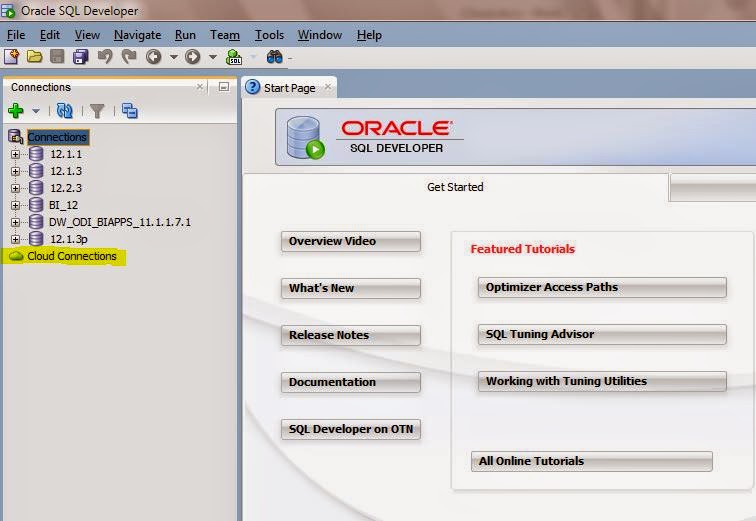
Another trigger that make me investigate more about Oracle Database in cloud was Sql Developer version 4.0.2.15 that has Cloud Connections options.
Live demo
In this video I’ll show how easy is to access and browse Oracle Database in cloud using SQL Developer 4.0.2.15
Get cloud database url
Create new Cloud Connection
Browse cloud database objects
If you liked this article feel free to share it with your fellows. Thank you!
For some other helpful videos check my YouTube Channel.
To receive notifications for new articles follow me